
Frame rate and refresh rate (FPS and Hz) explained
People talk about games feeling "smooth" or "choppy". That comes down to two numbers: frame rate (FPS) and refresh rate (Hz). One is about the PC. The other is about the screen. Here is what they mean, and why they need to work together.
What is frame rate (FPS)?
A game is really a fast run of still pictures, like a flip book. Each picture is called a frame. FPS means frames per second: how many pictures the PC draws every second.
More frames means smoother movement. Fewer frames means the game looks jerky. For most people, 60 frames a second feels smooth. Some players of fast games like more than that.
What is refresh rate (Hz)?
Refresh rate is about the screen, not the PC. It is how many times each second the screen can show a new picture. It is measured in Hz (hertz). A 60Hz screen can show 60 pictures a second. A higher refresh screen can show more.
Why they should match
The PC makes the frames. The screen shows them. So the slower of the two sets the limit.
- The PC makes more frames than the screen can show. The extra frames are wasted. You will not see them.
- The screen can show more frames than the PC makes. The screen waits, and you do not get the smoothness you paid for.
The best result is a PC and screen that are a good match. There is little point buying a very fast screen for a modest PC, or a very strong PC for a basic screen.
60Hz or a high refresh screen?
A normal 60Hz screen is fine for lots of games, such as story games, Minecraft and strategy games. It is also the cheapest.
A high refresh screen updates more often. It makes fast games, like shooters, feel quicker and smoother. Moving the mouse feels more direct. But it only helps if the graphics card can make enough frames to fill it.
If you mainly play fast online games and have a stronger PC, a high refresh screen is worth it. If not, 60Hz is a sensible choice.
What affects frame rate?
- The graphics card. This matters most by far. A stronger card makes more frames.
- Game settings. High settings look better but cost frames. Lowering shadows, effects and ray tracing gives more frames.
- Screen resolution. A sharper screen (1440p or 4K) has more dots to draw, so the PC makes fewer frames. See 1080p, 1440p or 4K.
- Upscaling. DLSS and FSR let the game draw a smaller picture and sharpen it, which gives more frames.
- The processor. It matters in some games, especially fast online ones, but less than the graphics card.
G-Sync and FreeSync (adaptive sync)
In a real game, the frame rate goes up and down. When it does not line up with the screen, you can see tearing (the picture looks split across the middle) or stutter (little jerks).
Adaptive sync fixes this. The screen waits for each new frame, instead of the PC rushing to keep up with the screen. NVIDIA calls it G-Sync. AMD calls it FreeSync. Many gaming monitors work with both. It makes games look smoother even when the frame rate dips.
Set your screen up properly
A high refresh screen often starts at 60Hz until you change it in Windows. Our guide to setting up your new gaming PC shows how. If any words here are new, try the jargon buster.
PCs strong enough for a faster or sharper screen
Picked from our shop's list by graphics card strength, then price. Prices update by themselves.
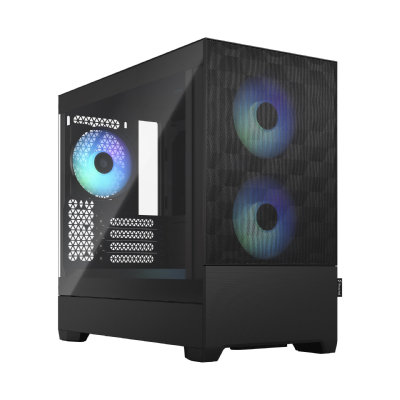
New build1440p gaming
Sandbox Serious Gamer 5 gaming PC
Ryzen 5 9600X + Radeon RX 9070 XT 16GB
Built for 1440p screens: Warzone, Fortnite, GTA V and Valorant at high settings, and new games like Cyberpunk 2077 play well.
- Processor
- Ryzen 5 9600X
- Graphics
- Radeon RX 9070 XT 16GB
- Memory
- 16GB DDR5
- Storage
- 1TB NVMe SSD
- Windows
- Windows 11 Home installed
£2,234.48
Built to order
Games this PC plays
- Fortnite Plays well
- Minecraft: Java Edition Plays well
- Minecraft (Bedrock Edition for Windows) Plays well
- Roblox Plays well
- VALORANT Plays well
- Counter-Strike 2 Plays well
- League of Legends Plays well
- EA SPORTS FC™ 26 Plays well
- Grand Theft Auto V Enhanced Plays well
- Marvel Rivals Plays well
Comes with an RGB case - you can swap it for a non-RGB case if you prefer.
Sold by Sandbox Computers, Worcester
New build1440p gaming
Sandbox Serious Gamer 7 gaming PC
Ryzen 5 7500X3D + Radeon RX 9070 XT 16GB
Built for 1440p screens: Warzone, Fortnite, GTA V and Valorant at high settings, and new games like Cyberpunk 2077 play well.
- Processor
- Ryzen 5 7500X3D
- Graphics
- Radeon RX 9070 XT 16GB
- Memory
- 32GB DDR5
- Storage
- 1TB NVMe SSD
- Windows
- Windows 11 Home installed
£2,540.33
Built to order
Games this PC plays
- Fortnite Plays well
- Minecraft: Java Edition Plays well
- Minecraft (Bedrock Edition for Windows) Plays well
- Roblox Plays well
- VALORANT Plays well
- Counter-Strike 2 Plays well
- League of Legends Plays well
- EA SPORTS FC™ 26 Plays well
- Grand Theft Auto V Enhanced Plays well
- Marvel Rivals Plays well
Comes with an RGB case - you can swap it for a non-RGB case if you prefer.
Sold by Sandbox Computers, Worcester
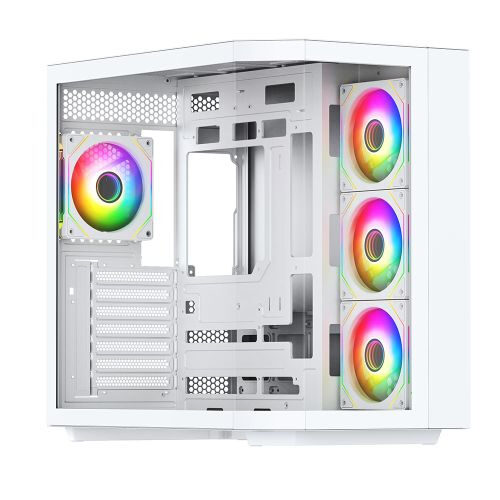
New build1440p gaming
Sandbox Serious Gamer 27 gaming PC
Core Ultra 7 265K + Radeon RX 9070 XT 16GB
Built for 1440p screens: Warzone, Fortnite, GTA V and Valorant at high settings, and new games like Cyberpunk 2077 play well.
- Processor
- Core Ultra 7 265K
- Graphics
- Radeon RX 9070 XT 16GB
- Memory
- 32GB DDR5 5600MHz
- Storage
- 1TB NVMe SSD
- Windows
- Windows 11 Home installed
£2,676.07
Built to order
Games this PC plays
- Fortnite Plays well
- Minecraft: Java Edition Plays well
- Minecraft (Bedrock Edition for Windows) Plays well
- Roblox Plays well
- VALORANT Plays well
- Counter-Strike 2 Plays well
- League of Legends Plays well
- EA SPORTS FC™ 26 Plays well
- Grand Theft Auto V Enhanced Plays well
- Marvel Rivals Plays well
Comes with an RGB case - you can swap it for a non-RGB case if you prefer.
Sold by Sandbox Computers, Worcester
Questions people ask
What is the difference between FPS and Hz?
FPS is how many pictures the PC makes each second. Hz is how many pictures the screen can show each second. The PC makes the pictures and the screen shows them, so the two work as a pair.
Is a 60Hz screen good enough for gaming?
For many people, yes. 60 frames a second feels smooth for most games and most players. Fast shooting games feel smoother on a higher refresh screen, but only if the PC is strong enough to make that many frames.
Will a high refresh rate screen make my games faster?
Not on its own. The screen can only show the frames the PC makes. If the graphics card cannot make more frames, a faster screen will not help much.
Do I need G-Sync or FreeSync?
It is not essential, but it is nice to have. It stops the picture tearing and stuttering when the frame rate goes up and down. Many gaming monitors include it.
What makes the biggest difference to frame rate?
The graphics card. After that, the game settings and the screen resolution. Turning settings down or playing at a lower resolution gives more frames.